Halloween on Amazon: how to prepare?

The successful time of the year for sellers is coming! The fourth quarter is generous with holidays, which means sales growth. It starts with Halloween, a holiday popular in the USA, Great Britain and European countries of the world. Helloween on Amazon is the beginning of the buying activity that continues on Black Friday, Cyber ​​Monday, and the pre-Christmas period.

For sellers, whether or not you plan to sell themed products, this is an opportunity to boost sales. Shoppers could spend $9 billion over the holidays this year, according to forecasts from the National Retail Federation. So choosing the right products is just the first step to staying competitive during this period.

How to increase the effectiveness of the results during the “spooky holiday”?

Of course, any Amazon seller knows about seasonal sales in advance and prepares for them ahead of time. Having formed a stock, preparing goods for the season, it is advisable to take a few more important steps.

Things to remember:

  • Create quality content – choose high quality photos, update descriptions, add relevant keywords, adjust listings. Upgrade your creatives (headline, photo or even video) to themed ones in Sponsored Brands and Sponsored Display campaigns. Keep in mind that shoppers often use holiday names in search queries, so you should add the word “Halloween” to your ad and backend. But it’s best to avoid such names in listings unless it’s directly related to the product, such as “Helloween suit”; 
  • Attract existing customers to the celebration. Make an e-mail newsletter among the followers of the Amazon page. Tell them about the special offers they can take advantage of. Tell them what you plan to do additionally for the Halloween customer. If you have a customer base, send out a simple promotional email with mechanics and details. Add a promo code or coupon. Don’t forget to add a CTA button that will redirect to your Amazon page. Send emails with a countdown to the start of sales and special conditions the day before. This will keep your customers up to date and will likely increase brand awareness significantly.
  • Prepare additional promotions, discounts, special offers. Offer free shipping. Prime members automatically receive unlimited 2-day shipping on orders over $25 on all eligible products;
  • Use holiday packaging whenever possible. Try to keep the “terrible-fun” format by updating the A+ content and designing the store. Halloween is the season of fun and your audience expects to be entertained. You should also share this content on social networks. For example, an Instagram prank, a Facebook funny joke contest, a Twitter slogan contest, and a terrible TikTok challenge are all great ways to build engagement and get attention for your brand;
  • Set up ads correctly. Add themed keywords to existing campaigns or create new ones with them. If the product is seasonal, prepare for a CPC increase during this period. Non-thematic product categories are also in high demand at this time. This is the last and very important step in preparing for any sale: it is recommended to increase your advertising and bid budget. Read more about how not to “drain” the budget of advertising campaigns in our article “Top 5 mistakes in PPC work on Amazon that drain the budget”;

Summing up, we want to emphasize that often, an interesting, high-quality product with incorrectly configured advertising or insufficiently well-optimized listings may be sold badly. This leads to unexpected results and wasted funds. This is easy enough to avoid by applying a professional approach to your listings. The marketplace algorithm is designed to always compare products, their monthly sales, and the number of reviews to determine how popular they are.

If you need assistance in preparation, our team is always ready to provide services individually for your goods.

Related Articles

Ukrainian entrepreneurs can sell on Amazon for a year without rate

Amazon UK and EU cancel the referral rates for Ukrainian export sellers! From September 6, a business with the Ukrainian shipping address is exempted for a year from paying a percentage of sales.

A few months ago, the Ministry of Digital Transformation of Ukraine, the marketplace promotion agency Disqover Agency, Ukrposhta and Startup Ukraine requested Amazon with a joint initiative to ease the conditions for Ukrainian sellers. As a result, we have great news today: Amazon is waiving referral fees for a whole year.

“In response to your request to support Ukrainian sellers on our marketplace, I am pleased to confirm that we are now introducing special conditions for businesses with a shipping address from Ukraine. From September 6, we are reducing the referral rate to 0% for a period of 12 months for all Ukrainian sellers on Amazon in Europe and the UK,” said Xavier Flamand, Vice President of EU Seller Services.

“Since the beginning of a full-scale war, we at Disqover Agency have seen the actual situation among Ukrainian manufacturers. Many entrepreneurs have lost their sales market, or it has significantly decreased. For many, scaling up to foreign markets has become a way out.

We understood that at present many giants are helping Ukraine, that the demand for Ukrainian is growing and will continue to grow. Amazon’s individual barriers to entry, including high site fees, are significant for many sellers. We have been observing this trend for more than 4 years, cooperating with hundreds of clients from Ukraine.

Due to the abolition of the referral commission, the investment burden on the entrepreneur is significantly reduced, which allows you to continue working in Ukraine and fight on the economic front of the state. We are grateful that the largest marketplace in Europe and the UK allows Ukrainian businesses to scale up and find new customers. I am glad that we managed to achieve such a result through joint efforts with partners.” – comments Alina Smolenskaya, CPO at Disqover Agency.

“Despite the war, Ukrainian business continues to operate. At the same time, a significant part of the companies enter the international market. Firstly, the demand for Ukrainian is growing, and secondly, for many companies this is an opportunity to scale up and find new customers. For every business owner, the support of Ukraine and the world is very important. That is why, together with partners, we appeal to global companies to support Ukrainian small and medium-sized businesses. The new conditions for our Amazon entrepreneurs are our common victory on the economic front. Now Ukrainians will be able to promote their goods to the world market on more favorable terms,” commented Mykhailo Fedorov, Minister of the Ministry of Digital Transformation of Ukraine.

Usually, Amazon charges a commission on every sale. Previously, the referral commission ranged from 7 to 17% of the price, depending on the category. In most cases, its size reached 15%.

“Ukrposhta, as the main logistics partner of Ukrainian exporters, has been actively lobbying the interests of entrepreneurs since the beginning of the war and, together with the world’s leading marketplaces, is looking for ways to support small businesses in Ukraine. So we have already managed to agree on special conditions for Ukrainian merchants on Wish, Joom and eBay. And now, thanks to joint efforts with partners, Ukrainian entrepreneurs have received unprecedented working conditions on Amazon. The decision of the marketplace to cancel the commission on sales in the EU and the UK for a year is an excellent addition to the EU policy in support of Ukrainian business. Given that the European Union has abolished duties on goods, including those sent in parcels from Ukraine, from June 4 for a period of a year, this decision by Amazon further improves the conditions for exporters. Thus, Ukrainian sellers will only have to pay the VAT of the country of destination, and this process is automated on Amazon through the Import-one-stop-solution (IOSS) system,” commented Igor Smelyansky, CEO of Ukrposhta.

“The abolition of the Amazon referral commission for Ukrainian sellers will not only allow us to keep the economic front, it is extremely important in general for the promotion of the Made in Ukraine brand. In the past, small entrepreneurs have faced many barriers when setting up their Amazon store. Now it will be much easier to do this, respectively, it will facilitate entering new markets and promoting made in Ukraine products in the world,” says Anna Petrova, founder of Startup Ukraine.

Xavier Flamand also noted that Amazon Web Services was honored to receive the Ukraine Peace Prize from the Ukrainian government and continues to help Ukrainians through many initiatives to support our country.

.

Related Articles

How to register your own brand on Amazon

Як зареєструвати власний бренд на Amazon

How to register your own brand on Amazon

Choosing to start your business on Amazon is one of the ways to increase sales in the e-commerce industry. By registering your brand on the marketplace, you can enter the global market and compete with niche leaders. The positions of companies with their own TM are much stronger in the US and other countries. To get Brand Registry on Amazon, you need to go through several steps. Now let’s look at them in more detail.

Benefits of Brand Registry on Amazon

The following business benefits are unlocked for the owner brand on Amazon:

  • Creation of extended content. A+ content contributes to the information spreading about the brand’s history, product functions. Images on pages and texts improve conversion rates. According to the marketplace, this helps to increase traffic, and, accordingly, sales;
  • Launch of branded advertising. Brand owners have the opportunity to customize ads on Amazon, choose headlines and 1-3 products with a logo for a promotion;
  • Analytics. Amazon provides opportunities for obtaining analytics, including reports on the behavior of buyers and analysis of keywords. This allows you to make good strategic decisions;
  • Bonuses for new sellers. By registering your own TM on the platform, you can get discounts and bonuses. A detailed list of rewards can be found on the Amazon website;
  • Managing product lists. Merchants can produce accurate listings of their brand’s products, the developers say. This allows customers to receive more accurate information about products, find the right goods faster;
  • Proactive defense of TM. Automatic Brand Information security controls on the marketplace work to protect copyright if there are infringements. The more information the seller provides to the TM Registry, the better it will be possible to defend yourself in disputable situations;
  • Intellectual property infringement report. Powerful marketplace tools allow you to find potential violations and immediately report them.

The Amazon team works 24/7 to respond to fraud and counterfeit activities. Thanks to the listed tools, more than 700,000 brands are protected on the marketplace. This allowed Brand Registry to become customer-oriented and improve customer service. According to Amazon’s Brand Services website, more than 4 million scam accounts were stopped in 2021 before they added products to listings for sale. According to platform sellers, the number of violations and fakes has decreased by 99% since they registered the Band Registry.

Features of registering TM on Amazon with IP Accelerators

The process of registering a trademark on Amazon is a complex and time-consuming process, but it is essential for growing an e-commerce business. Each seller can independently obtain a Brand Registry using IP Accelerators. Waiting for registration results will last an average of a year. However, there is another way – to use the help of partners who have experience and can facilitate the registration of TM on Amazon.

The main stages of obtaining Brand Registry and registration of TM

To register their own brand, many sellers partner with experienced agencies to help them get Brand Registry on Amazon. The following steps await you in the future:

  1. Review. At this stage, preparatory work and the search for partners who will help with brand registration take place. It is important to study the list of agency services, understand the specifics of the work, and familiarize yourself with the cost of services.
  2. Collect information about the brand to be registered. To do this, the brand owner fills out a special form and indicates all the data about the TM. Next comes the coordination of all points, nuances, information is supplemented, corrections are made.
  3. Payment for services. When all the data is agreed, the client receives an invoice in order to pay for the TM registration services.
  4. Research. Although some underestimate this step, it is significant, because it allows you to check the uniqueness of the brand name and make sure that such names do not exist. Only with a unique TM name registration will be successful.
  5. Apply. After the preparatory work and verification of the TM data, the partner company submits an application for brand registration. After that, the client receives a registration number.
  6. Direct registration of TM. After receiving the registration number, you can then enter data into the Amazon Brand Registry. Registration is carried out for the same legal entity for which an account was created on the marketplace. By the time of filing the application, it lasts 3 working days, and the receipt of the application number is made on the day of its submission.
  7. Expecting results. Perhaps this is the longest stage, since it can take several months or a year. Currently, the partner agency constantly checks the information and controls the process.

Despite the fact that registration takes a certain time, after receiving the application number, the brand owner can already enjoy the benefits of the Brand Registry on the marketplace. This will help increase the reach of potential customers on the Internet and help promote products on Amazon. In general, the TM registration procedure on the platform is clear, however, in order to succeed, you need to responsibly go through all the steps.

Related Articles

Top 5 mistakes in PPC work on Amazon that drain the budget

Top 5 mistakes in PPC work on Amazon that drain the budget

Working with advertising on Amazon, it is sometimes difficult to understand why it does not bring the desired results. Often the reason could be found in PPC work errors. Clients usually ask our colleagues what not to do in the PPC model on the marketplace, and what steps drain the budget before advertising starts to affect sales.

Having extensive experience with the Pay-Per-Click ads model on Amazon and other trading platforms, we suggest you consider the top 5 most common mistakes. By knowing and   avoiding them, you can take a few steps closer to an effective marketing strategy. We also offer you to consider cases when our clients’ advertising on Amazon did not work, and after analysis we eliminated the problems. These changes contributed to successful sales of goods on the marketplace.

Mistake 1: wrong choice of keywords

You registered on Amazon and set up ads. But something does not work, the budget ends quickly, in the middle of the day. You need to go to the advertising account and analyze the keywords that you used for the advertising campaign. Now everything is clear. Here is the first mistake – the wrong choice of keywords. If you do not fix it, it will lead to negative consequences for your business:

  • Using irrelevant keywords, your products will be shown to uninterested buyers. They do not need your product, and accordingly – they will not buy it (or convert). You should choose relevant keywords so that interested buyers can find your product;
  • At the same time, if you use keywords that are too high at the beginning of your promotion, you may face high competition, which will force you to spend a lot and sell little. To avoid this, try to use less frequent or long tail keywords that will most closely match your product description;
  • Analyze what non-obvious requests for your product can index your competitors. If they occupy top positions there, then this means that they receive sales from it. Such requests will usually have low competition, and therefore you can use them to increase additional sales without incurring insane costs. This will help you boost your sales rank and thus be better indexed for other queries.

It is very important to work on the keys, remove some, replace some, and you will correct the first mistake in working with PPC. 

Mistake 2: Not Enough Advertising Funds

You have set up ads on Amazon and are waiting for users to actively buy your products. However, the results do not live up to expectations. You check all the settings and see that the budget has disappeared somewhere. What is the reason? Here is the second mistake – there are not enough budgets for promotion, you do not know how quickly the daily budget ends and how much money you need for this. This happens if you do not investigate and analyze the level of indicators to determine the required budget.

To do this, is needed to analyze the following indicators:

  • CPC (Cost per Click): to set the optimal bid for a keyword;
  • Conversion rate: this will allow you to understand how many clicks you need to sell a product;
  • Distribution of expenses between campaigns with different goals.

It is worth reviewing the statistics of the advertising campaign and analyzing it. This way you will notice which days of the week customers are more likely to shop. These days you need to increase the budget, which will increase efficiency. It should be noted that the analytics are displayed with a delay of 2 weeks.

Mistake 3: lack of advertising structure

If, after launching an ad, you have problems with the optimization and analysis of your advertising activity, then in most cases this is due to the lack of an advertising structure.

How to build an advertising structure? We offer you the following tips:

  • Divide products into different campaigns and portfolios;
  • Use a separate match type for each individual campaign;
  • Don’t use too many keywords in one campaign; try to divide them into clusters;
  • Name campaigns in such a way that the name makes it clear:

      what type of campaign it is;

      what match type in key queries;

      which cluster of keys or categories the campaign belongs to;

      what product is being promoted;

      what bidding strategy is used;

      goal of the campaign (desirable).

In addition to making it easier to process data and make decisions based on it, it will also improve the effectiveness of the campaigns themselves, since they will have fewer errors.

Don’t set profit maximization goals until you’ve reached the top competitors’ sales. Otherwise, you won’t be able to reach a low (the lower the better) seller rank. But this applies to conversion only in the context of the fact that when we are trying to maximize profits, we need to leave only converting keywords. This will reduce costs along with the number of sales, and this affects the sales rank, and thus the organic issue. 

Mistake 4: promoting all products at once

If you have eliminated all the above errors, and PPC is still not working as it should, review your advertising account again. Perhaps you decide to promote all products with one campaign, and this is the fourth mistake on our list. It is impossible to use a small budget and advertise the entire range of your brand at one time. This will result in the following:

  • Goods will not be included in the search for the corresponding key queries;
  • You will take fewer places (placements) in search results because one of the listings will be indexed;
  • The campaign budget will end faster, spreading across different products;
  • It will be impossible to obtain adequate statistics and analyze the performance (results of work) of individual products.

Never try to do everything at once. Divide products into different portfolios; create different advertising campaigns for them. Then you can analyze them, increase efficiency and successfully make sales.

Mistake 5: Leaving everything to chance

After setting up all the advertising options on Amazon, some sellers leave ads unattended, thinking that everything will work by itself. However, the results again do not meet your goals. You start creating new campaigns, testing different types of campaigns, and stopping old ones. You need to understand that different types of PPC campaigns have their own advantages and disadvantages. You can use all types, and they will bring you positive results only if you intervene and constantly monitor the campaign.

After launching the ad, you need to:

  • Study statistics regularly;
  • Adjust PPC settings;
  • Analyze search queries and, if necessary, negative them, or vice versa – transfer them to separate campaigns.

These and other actions with settings should be performed only when necessary, when you see the appropriateness of changes. It is the control of advertising that will help to improve it and increase its effectiveness.

Cases of our clients

 Now let’s look at significant errors in the PPC settings on the marketplace that our clients have dealt with. We helped them understand what the problem was and fixed the situation. After that, the ad showed effective results and convinced customers that PPC works great on Amazon.

Case 1. How did a high-frequency query affect advertising:

  • Situation: The client had an automatic advertising campaign with a limited budget per day, categories, a few precise keywords and campaign research;
  • Problem: out of all campaigns in terms of the number of views, clicks, the exact worked best, but no campaign brought sales;
  • Problem Identification: Exact analysis of the campaign showed that there was a keyword that was popular (high frequency) among others in this category that were related to the product, and it was a high bid. It used the entire daily budget, so the ads stopped working at noon. Goods promotion has been significantly restricted at various times and by other requests;
  • Correction of the situation: increase in the daily budget by 35%, since the category is competitive, which will allow advertising to work around the clock. We also advised to exclude the “expensive” high-frequency request so that it does not spend money. Instead, you can use longtail keywords from your research. These queries have less contention. You can also reduce the bids for some keywords and exclude some queries so as not to burn the budget in vain;
  • Results: the campaign brought us more information, on which we optimized advertising and created new effective campaigns to make successful sales.

Case 2. Lack of structure:

  • Situation: the client had several advertising campaigns, different in type, but there was no structure;
  • Problem: Difficulty in optimizing campaigns and lack of results;
  • Problem Identification: The same keywords or search terms worked in multiple campaigns at the same time without producing results. Also, different keys gave the same requests, and if the result was bad, the keyword was stopped (paused). The other key continued to work, but attracted the same requests, which also had no effect. In addition, each campaign used different products, and they are suitable for different queries. Without a clear structure and division into groups, it is impossible to analyze the results in the issuance of a product search;
  • Correction of the situation: to facilitate the analysis of the work of all campaigns, we have developed an advertising structure. Campaigns are divided by types, and products by portfolio. We analyzed lists of keywords, from which duplicates were excluded, and unnecessary (irrelevant / those that led to expenses) search queries were moved to the negative (excluded);
  • Results: Thanks to this, we were able to get the results of advertising, see which keywords work for which products, and also reduce their number. Correcting the situation helped to effectively reallocate the budget and get positive results.

What does fixing PPC errors on Amazon do?

Every seller on Amazon can make mistakes when working with ads. Among the biggest problems are:

  • Incorrect selection of keywords;
  • Limited finances for the advertising rate;
  • No testing of PPC options;
  • Promotion of the entire range in one campaign;
  • No adjustment of target data.

The most important tip for a successful PPC launch is to carefully prepare your listing. To do this, check the quality of your product images, prepare up-to-date product descriptions, formulate good product names using relevant keywords, and use “A +”. These are the primary steps before the start of the promotion, which must be done so that properly configured advertising campaigns work more efficiently in the future. By knowing the above mistakes, you will avoid them. All this will bring you closer to successful Amazon sales and revenue growth.

Still have questions?

Fill in the form and get a free manager consultation

More articles

When will Amazon Prime Day 2022 take place and how to prepare?

When will Amazon Prime Day 2022 take place and how to prepare?

Amazon Prime Day is announcing its annual event on July 12-13, offering Prime members discounts on products from leading national brands and vendors from all over the world in a variety of categories, from fashion and electronics to toys and household items.

Why take advantage of this event and how to prepare?

According to marketplace statistics, in 2021 during Amazon Prime Day, consumers bought goods for 11.2 billion dollars, which is 7.7% more than in 2020, when sales amounted to 10.4 billion dollars.

 Since 2015, Amazon has been holding a giant sale, Amazon Prime Day, every July. In fact, it is an analogue of the famous “Black Friday”, but not at the end of the year,  in the summer. A huge wave of discounts, from clothing to electronics, and it’s all just for Prime subscribers.

So, here are some basic tips for sellers when preparing for Prime Day:

Evaluate your Amazon FBA (Fulfillment by Amazon) stocks in advance.

Of course, preparation requires covering many aspects, but the main thing we recommend to start with is fulfillment. Availability of goods will affect your rankings and sales. It is necessary to take care of replenishment of balances in advance and calculate the required amount of stocks of products in view of the increased demand for goods to avoid “out of stock”. Also, if you have a wide range, Amazon believes that you are more valuable to marketplace customers.

The categories that were in high demand last year were: clothing, household appliances and jewelry. If you are a brand or retailer in these categories – make sure you have enough stock to meet the needs of your customers.

The growth of sales from external traffic increases the dynamics of organic sales.

How does it work? Due to the high level of competition and the equally large number of offers from all sellers within Prime Day, external traffic can be a useful tool to increase sales. When people start buying products often from links from various external sources (advertising on social networks, recommendations from bloggers, sites that have included the product in their article, links in the comments of social network users) – Amazon also notices this activity.

Such algorithms encourage the marketplace to consider the product interesting for buyers, and Amazon is beginning to promote this product organically.

We also recommend paying attention to Attribution for brand owners. When you start external traffic, you can track it and return 10% of the costs.

Effective external channels:

  •         Facebook Ads,
  •         TikTok Ads,
  •         Google Ads,
  •         Bing Ads,
  •         bloggers,
  •         BrandPush

Optimization

Optimizing product lists plays a huge role in maximizing sales and conversion rates for salespeople. What to do?

Optimize title and description. Write a specific, concise description of the product that is completely true and convincing for a particular product. Optimize texts for the mobile version. Remember to follow the number of characters in the product description recommended by Amazon. Add information about the product, such as: for whom and for what it is used, size, color, type of packaging, etc.

Write “catchy” text. Include in Bullet Points all the benefits and details of your product that will encourage the buyer to choose you. Customers love to read a good story about the brand and the product.

Keywords: Think about using keywords that are relevant to Prime Day. Remember to include similar search terms that your target audience will use to search for a specific product. You can also run additional PPC campaigns to identify new keywords. In addition to Prime Day, it is recommended to do it in advance, 2-3 weeks before the start. Another important point is the additional budget for advertising companies, as the cost of traffic during this period may be more expensive.

Images: check the quality of images, avoid low quality, and follow Amazon standards. Having high quality images will have a positive effect on your click through rate. Develop attractive photo content on the listing. Demonstrate it from different sides, as it is used in life, so the buyer will be easier to imagine yourself with this product. Detailed, “vital” photos work well with buyers who never read the description.

Use A+ Content Manager. This service allows you to add additional text with an image, which can influence the decision to buy your product.

Reviews. Gather feedback. Feedback can affect the indexing and level of trust from the buyer. A significant role in making a decision to buy (especially a new, unfamiliar to the buyer before) the product is the rating and reviews. Customer success is important to the Amazon audience. 

It is also possible that competitors will begin to “fight” and “throw” negative reviews just before Prime. Naturally, this can significantly affect sales performance. Therefore, it is important that outside negative feedback does not prevent you from getting good results.

Internal search terms: Add relevant search terms and do not repeat keywords from your records.

Promotions and discounts. Promotions and special offers play a significant role during Prime Day. For example, special offers such as coupons for goods at a reduced price, a discount on the purchase of 3,4,5 units of goods, the purchase of 1+1 = 3 – all this guarantee an advantage over other sellers.

 Use Prime Exclusive Discount during prime action, listings with such a discount will be displayed with the “Prime Day Deal” badge for prime subscribers (Eligibility Criteria for Prime Day)

Lightning at Amazon Prime Day is a great way to quickly increase sales of your product. Despite the fact that they operate for a limited period of time, they are a powerful tool to increase orders and, consequently, sales.

*Note. Lightning deals may not be useful for new sellers.  You need to build a reputation first.

*Advice. If you are planning to seriously prepare for Amazon Prime Day sales, you should definitely consider offering special offers for several products at competitive prices. Amazon will be full of offers on Prime Day, and it can choose only a few offered by you. So make sure you prepare as many suggestions as possible, do all the research you need, and do your best.

Creating product packages. The influx of buyers is a good opportunity for a “smart” sale of their own stocks. Your main goal in Prime Day can be not only to increase sales, but also to maximize the sale of goods that are already in stock. In addition to the added opportunity for sellers, customers really like packages of goods when they are effectively grouped, this makes them convenient to buy. The best way is to create product packages that complement each other. You can review. Amazon reports to understand how to effectively integrate your products.

Still have questions?

Fill in the form and get a free manager consultation

More articles

The stamp from “Ukrposhta” is now on eBay!

The Disqover Agency team in partnership with Ukrposhta  lounched the iconic ship stamp for sale on global e-commerce marketplaces, and now with other branded goods it can be purchased on eBay!

Here are the details!

Our partners, the national postal operator “Ukrposhta”, became the first post office in the world with an online store on eBay, and from now on you can buy stamps, envelopes, as well as themed sweatshirts and magnets produced by the company from all over the world. Symbolically, and all for victory! From May 23, the store is available at the following link:

https://www.ebay.com/usr/ukrposhta_jsc

All participants of the cooperation commented on the event:

“We are happy to welcome Ukrposhta to our platform and to continue the fruitful cooperation by becoming the first postal service to open an official store on our platform. With over 142M active buyers worldwide in 190 markets, eBay opens the opportunity for businesses of all sizes to start their global journey and reach potential buyers all over the world. We are proud to take part in the growth of Ukrainian SMBs and together with Ukrposhta we will continue to support local SMBs, assisting them with personal guidance and other benefits through our growth program” – Alon Paster, Head of Commercial Development, eBay emerging markets”.

“Ukrainian goods are in high demand on world markets due to their quality and uniqueness, and now buying Ukrainian goods is also an opportunity to express support and to help the country. We are currently helping Ukrposhta to bring the famous postage stamp to eBay with its own brand store. Usually, the registration and verification of the seller’s account, preparation of documents, preparation of the listing take much more time, but our team is using all possible solutions to speed up the process to make Ukrposhta store available to buyers from around the world as soon as possible. We hope that global sales of the iconic stamp will be another effective tool to support Ukraine”Artem Sukhina, Co-Founder of Disqover Agency, Managing Partner at BRISE Capital.

“Over the past month, Ukrposhta postage stamps have become popular not only in Ukraine but also in the world. I know that a lot of foreigners want to buy commemorative stamps. For their convenience, we have launched this eBay store to enable shopping from anywhere in the world. In addition, selling on an international marketplace is not only about convenience and accessibility, but also about diversification. As practice has shown, selling postage stamps on one platform can result in its failure because of a large influx of buyers. Now we are offering specific platforms to foreign buyers and others to Ukrainian ones. It is symbolic that Ukrposhta, which for years has been training Ukrainian entrepreneurs to open and promote their own stores on marketplaces, including eBay, is now opening a store itself” – Igor Smelyansky, CEO Ukrposhta.

Online shopping on the marketplace involves a charitable component. $5 from each order containing the Ukrposhta stamp will be transferred to the KSE Foundation charity fund.

All funds raised will be directed to three areas:

1. Assistance to schools and kindergartens to be recovered after the war.

2. Organization of humanitarian cargo logistics.

3. Humanitarian aid.

eBay is one of the largest trading platforms with more than 142 million active customers in 190 countries.

Every day, more and more Ukrainian brands can be purchased abroad!

Read also

How can Ukrainian entrepreneurs enter the world marketplaces?

How can Ukrainian Entrepreneurs Enter the World Marketplaces?

This was the topic of the live broadcast, which we held together with our friends, the company Startup Ukraine. CPO of our agency Alina Smolenskaya, with the participation of Anna Petrova, founder of Startup Ukraine, discussed the peculiarities of access to international e-commerce platforms, and discussed the starting steps for manufacturers.

The main issues were:

  • What marketplaces are currently available for Ukraine;
  • What are the first steps in the expansion of global e-commerce platforms;
  • What is useful in doing research and why it is necessary;
  • Where to search for statistics of specific goods;
  • Should it be mentioned that the business is Ukrainian;
  • What is the difference between Amazon in Europe and America;
  • How to promote your product on Amazon, etc.

We are happy to share this video discussion with you, especially now, when one of the most important tasks of consulting agencies is to support Ukrainian entrepreneurs who are planning to expand their business to global e-commerce platforms.

We hope that everyone will find useful information, here is the link:

https://www.instagram.com/p/CdO30WosVIv/

Discover your options

To get more information about the access to international platforms for your product, fill out the form. All fields are required.

Related Articles

A Guide to Creating Your Account and Selling on Amazon

A Guide to Creating Your Account and Selling on Amazon

Contents

Marketplaces are occupying an increasing share of the e-commerce market. In 2018, Amazon made up 49% of online sales in the USA. Interestingly, Ukraine ranks among the top 9 countries with more than 10 thousand sellers on this platform. Nevertheless, creating an Amazon account is considered to be a hard thing. 

To make the process simpler, we’re offering you to follow our step-by-step guide to creating your Amazon seller account.

Creating Your Account Is the Key Yet Hard Step to Sales

Ukrainian producers should grow their sales by expanding to foreign markets. Developed countries offer much larger markets to make sure everyone has enough space for sales. Moreover, they recover faster from economic crises. 

Another advantage is that marketplaces give quick access to large sales markets and end consumers, while the threshold for entering the market is relatively low and easy.

Creating an account is the major problem many potential sellers face at the beginning. On Amazon, this process is fraught with many pitfalls: the paperwork, transfers, proof of residence, etc. Although we recommend consulting professionals right away, let’s take a look at how it works.

Step 1: The Paperwork

Creating an Amazon account for an individual requires you to check whether all of the documents are at hand:
  • A copy of your passport or a certified translation of your internal passport
  • Contact details, such as your name and surname according to your passport, email, and phone number
  • Credit card details
  • A USA bank account for receipts you earn on Amazon

Step 2: Setting up a Connection to a Proxy Server

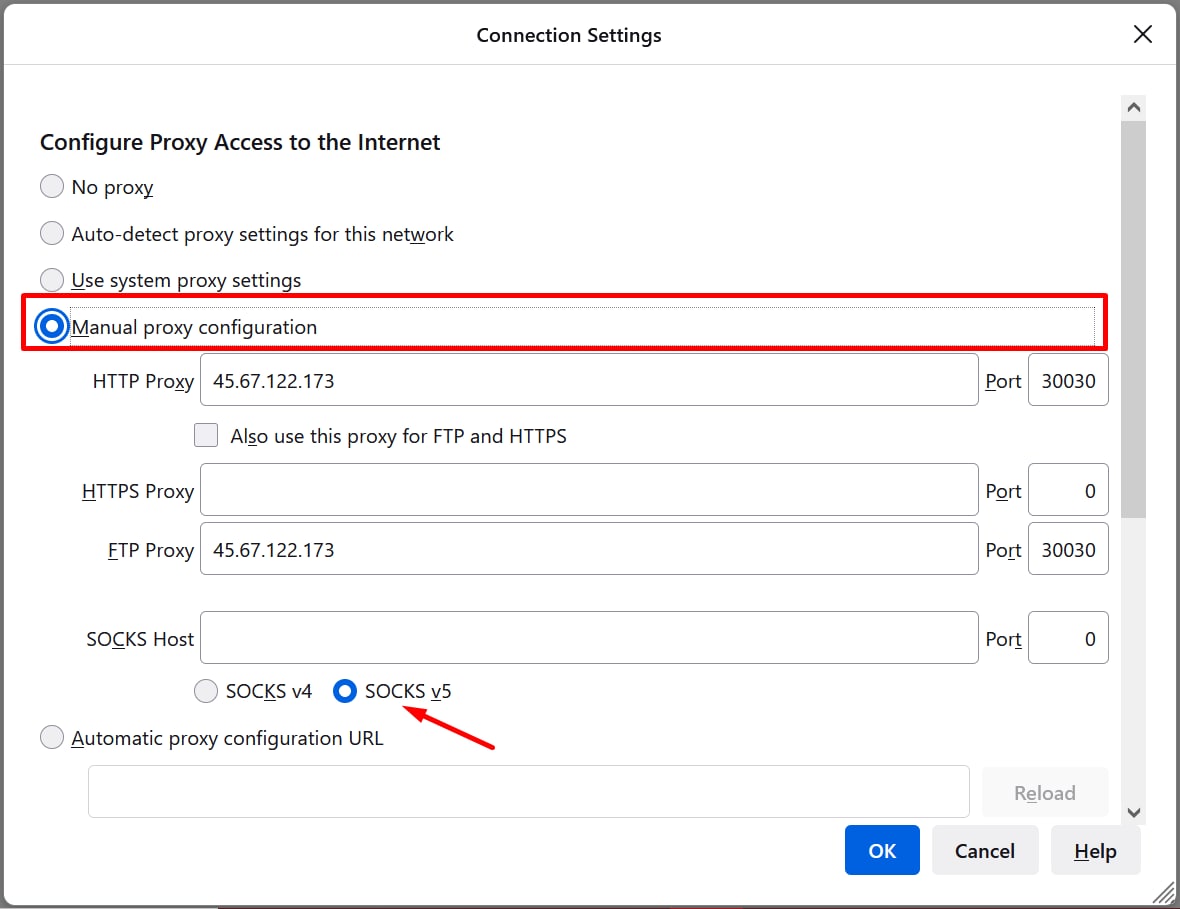
Your next step is to buy IP addresses and connect to a proxy server. 

If Amazon catches you logging in to several accounts with the same IP address, it’ll immediately block you. Here’s a case: when several neighbors logged in to different accounts with the same IP address in their apartment block, Amazon blocked them. For that reason, you’d better always log in with a secure IP address.

Step 3: Creating an Account

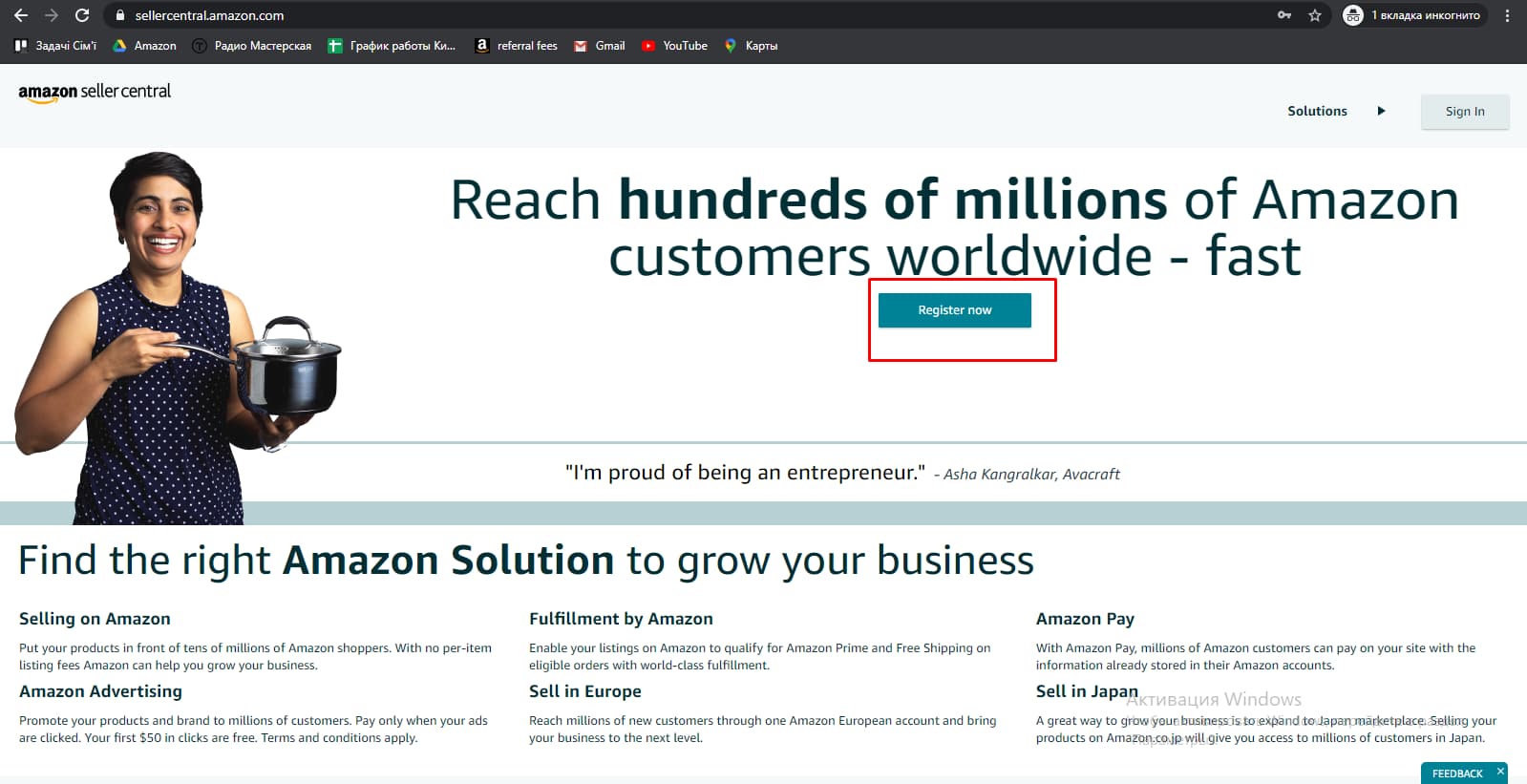
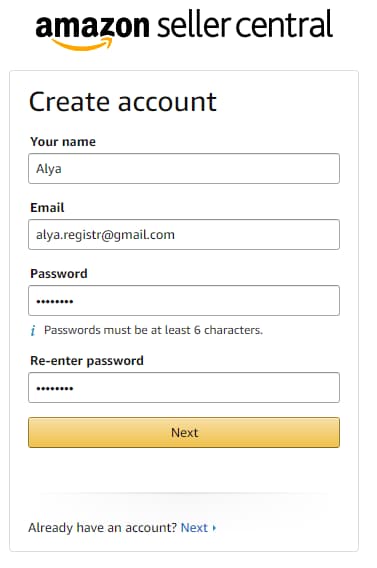
Let’s now create a seller account. The first thing to do is set up a connection to a proxy server. After that, you need to log in to an existing buyer account and click the “Register now” button on sellercentral.amazon.com.
Here’s a step-by-step process:
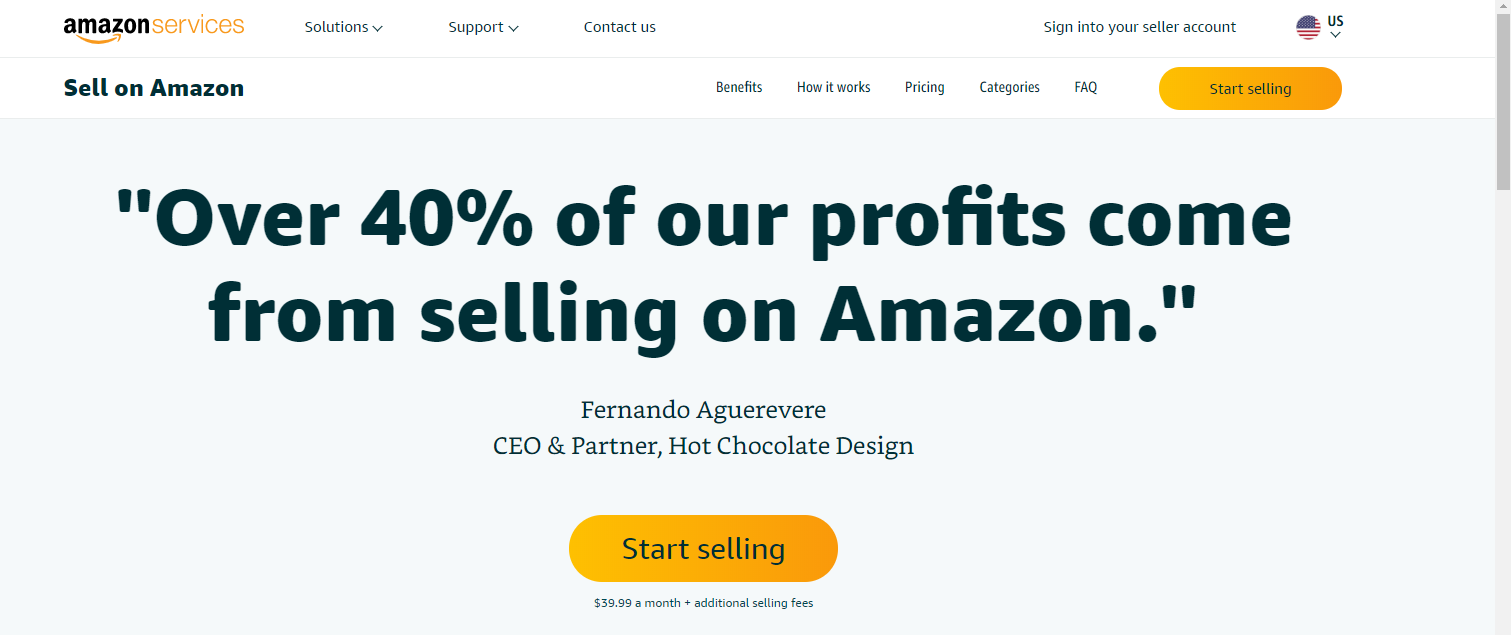
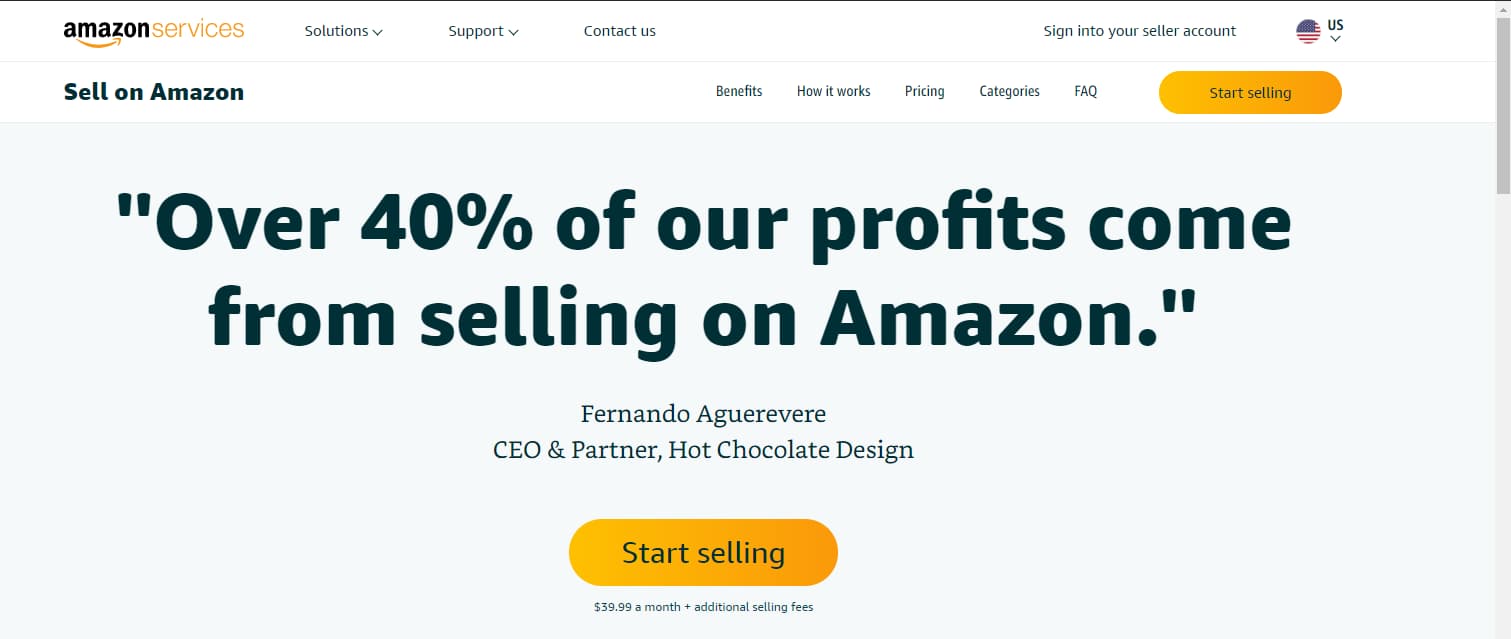
  1. Click the “Start selling” button.
  1. Next, enter your email and password and click “Create your Amazon account”.
  2. Enter your details in Latin characters.
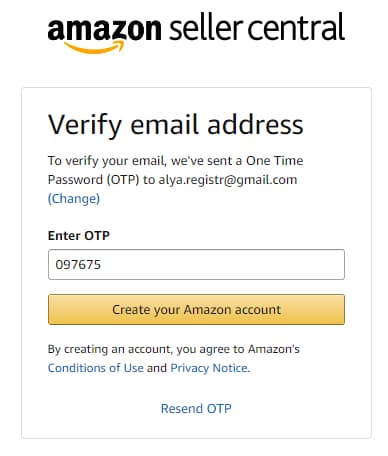
4. Confirm your email address.
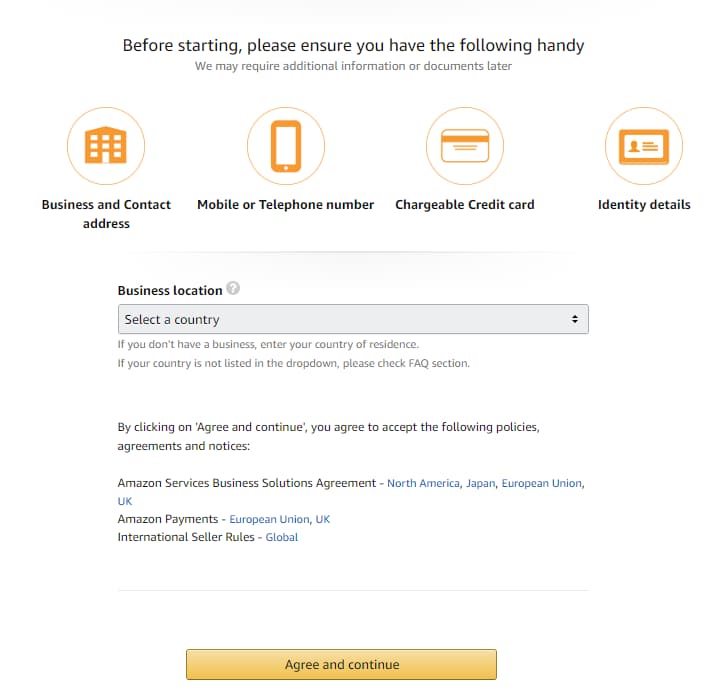
5. Choose your business location, i.e., a country where a legal entity or an individual is registered.
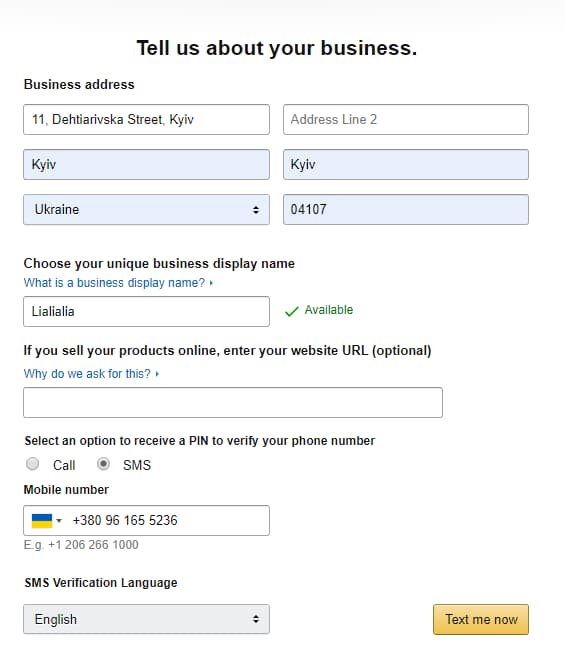
6. Fill in the following fields: a company name (or an individual name), address, phone number and seller name on the website.
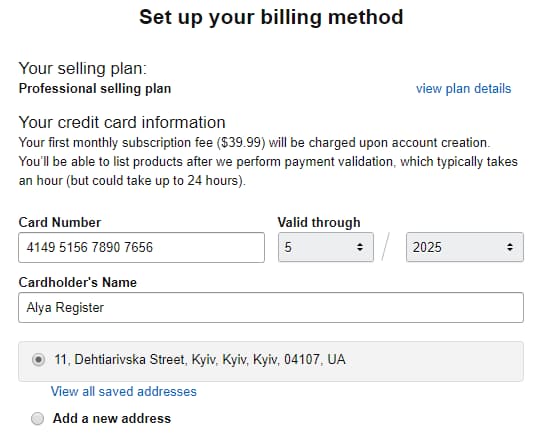
7. Specify your bank card details—it can be issued in any country and for any currency. Visa, MasterCard, American Express, Discover, Diners Club or JCB will do.
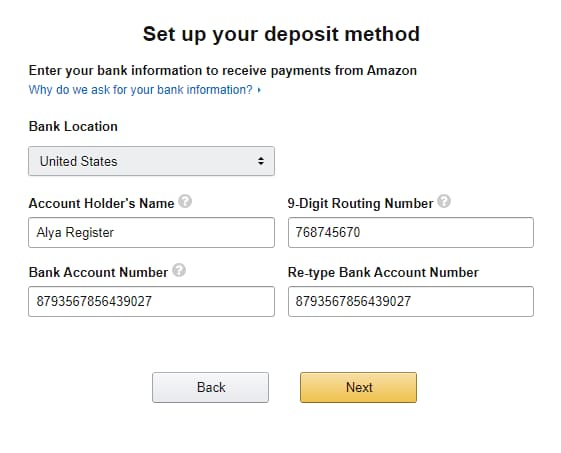
8. Enter your bank account details to receive transfers from Amazon. You can sign up for a Payoneer card to get a USA bank account.
  1. Add your tax details. You need to answer whether you register as a legal entity or an individual as well as a resident or a non-resident of the USA, complete the “W9-BEN” form (basic details, such as your address, country of registration, etc.) and finally sign the form. 
  2. Add your listing and product categories. The system will ask for general data on your products: origin (hand-made or factory-made products), identifier type, batch volume, your website that features your products, etc.
  3. Check the details you’ve entered and upload your passport and bank statement.

Done!

Step 4: Verification

Sometimes Amazon may ask you to provide additional documents once you’ve created your account. At this step, Amazon almost always blocks accounts until sellers prove their identity. 

Next, Amazon emails you a request to provide additional documents to the address you’ve specified when creating your account and to Seller Performance Notifications.

Once you’ve logged in, you’ll see your notification highlighted in orange. 

  1. You’ll have messages from Amazon in the Performance Notifications section. Read all of them carefully to understand what information they want to receive from the seller.
  2. After that, you need to send the pre-arranged documents: your utility bill, including gas, water, electricity or the Internet.

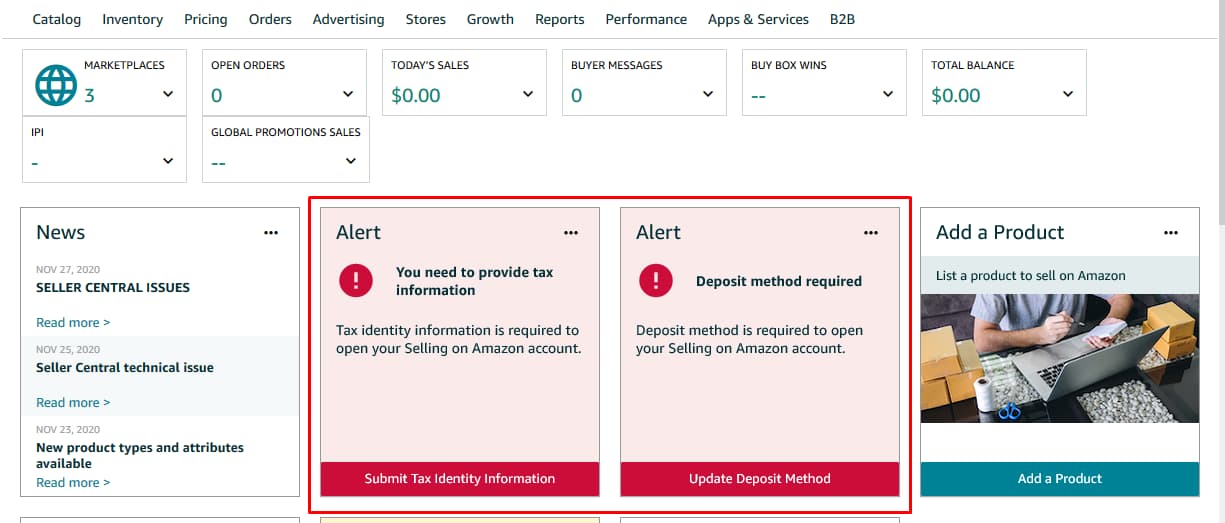
If you’ve skipped some of the blocks when creating your account, Amazon will ask to provide additional information once the account has been verified. You’ll see red windows on the home page. You need to click on them one after another and add the information required by Amazon.

____

It’s a sure thing that you can create an Amazon account on your own. But the reality is more and more beginners are automatically blocked by the platform. 

Disqover Agency’s team helps you get the best experience on Amazon at all steps: creating an account, verification and turnkey account kick-off. We create Amazon accounts for the USA, Europe, UAE and Australia.

If you have any questions about creating Amazon accounts, our specialists will be happy to advise you on this matter for FREE. Please follow the link to leave your contact details, and we’ll get in touch with you as soon as possible!

Related Articles

No Niche Research as a Biggest Mistake to Avoid When Selling on Amazon

No Niche Research as a Biggest Mistake to Avoid When Selling on Amazon

Contents

Amazon is the largest e-commerce marketplace where anyone from over a hundred countries can sell products. And you’ll only need to have Internet access to create an account and make sales. 

According to Amazon, more than six million people in the USA shop on Amazon daily, while the marketplace makes up about 48% of America’s e-commerce market. Other surveys show that the platform offers about 350 million different products. Nevertheless, not all of them are in demand and help their sellers make money.

You’ll find it extremely hard to predict whether a given product will be hot to sell on Amazon.

According to our in-house statistics, seven out of ten surveys prove that a product shouldn’t roll out in its original form.

To cut back on your expenses and mitigate your risks, you must first analyze the niche. Read on to learn the details.

What Is Niche Research?

Niche research is all about analyzing commodity groups on Amazon to understand whether it’s worth entering the marketplace with an existing product. We carry out researches for both the USA and European markets, depending on the client’s needs. Our research helps answer the important questions about product launches, such as “Do I need to adapt my product or packaging?” and “Which product ranges do I need to roll out to make a profit?” 

Moreover, we assess the buyer interest, potential income, sales, profitability and competition on Amazon. Potential sellers can be sure that buyers on the platform need their products. Niche research is an investment in your future sales. At Disqover Agency, we carry out niche research for Amazon by taking a stepwise approach.

Steps to Carry Out Niche Research for Amazon

Step 1: Demand Analysis

In e-commerce, strong demand means a slew of relevant search queries, i.e., people really want to buy certain products. At Disqover Agency, we measure product demand using special programs. Over the years, we’ve developed some niche size metrics. Please take a look at our example: 

  • Large: 800+ thousand queries
  • Medium: 350–800 thousand queries
  • Small: less than 350 thousand queries

It’s not that simple, though. You must take into account your competitors who run ad campaigns for specific queries and use the right keywords in their listing texts.

After measuring the niche size and the competitor count, we analyze branded traffic, i.e., search queries related to specific brand names. For instance, the shampoo niche generates more than five million queries per month, but 25% of them are branded queries (“head and shoulders”, “biolage” and “kerastase”), while this makes the real niche size much smaller. The niche is large in terms of the query count, but at the same time, branded traffic makes up a quarter of its size.

The number of users who don’t care about brands is far less than initially estimated. Nevertheless, it’s important to take a holistic approach to analyzing each product and consider all factors. Even if branded traffic is enormous, you can always build your reputation and compete with existing brands over time.

Step 2: Competitor Analysis

Analyzing competitors on Amazon consists of several steps: 

Step 1: we collect and analyze competitor data from Amazon. This includes average monthly sales, price, price history, seasonality, fulfillment, BSR, product rating and review count.

Step 2: we outline the key parameters of each competitor product. For example, we outline such parameters as “application” and “volume” when analyzing the shampoo niche.

Step 3: we process the retrieved data. This is the key and most time-consuming part.

Pushing the analogy with the shampoo niche, we can give answers to the following questions:

  • Which price segment is the most popular and helps make more money?
  • Which hair types bring more shampoo sales and which ones bring less?
  • What volumes are in demand (sometimes these data are different from assumptions)?
  • What is the most popular shipping option among end consumers?
  • Is there an A brand (a key player who takes most of the sales in the niche)?
  • What is a threshold for entering a niche based on reviews, etc.?

Step 3: Calculating Unit Economics

This process comprises two key steps: measuring margins and choosing competitive prices. Over the years, we’ve managed to find the minimum margin level you must have to enter Amazon. Otherwise, you’ll spend all of your income on advertising. Besides, the lower the margin, the more sales you’ll need to make a profit. Consequently, you’ll have to be making investments for a long time if you have to make more sales.

Step 4: Preparing a P&L Forecast

Our team has drawn up a P&L statement template that covers all of the features for your business on Amazon: 

  • Product size tiers according to Amazon
  • ACoS (Ad Cost Over Sales), i.e., a metric that helps assess how efficiently and profitably you run ad campaigns on Amazon
  • Portions of organic and PPC sales

This step helps you figure out the investment period, break-even point and total investment with specific expense items, such as manufacturing, shipping to Amazon warehouses, marketing costs and Amazon commissions.

Keep in mind that Amazon is an extremely dynamic marketplace where forecasting sales is a hard thing. The marketplace regularly introduces new rules and commissions. Therefore, this forecast is rather approximate. It’ll help answer the question about whether sellers make sales with certain products on Amazon.

All in all, niche research consists of four steps that hide many subtleties and vital nuances. Disqover Agency’s team helps you get the best experience on Amazon at all steps, including researches on product niches before you enter the marketplace.

Should you have any questions about niche researches for Amazon, our experts will be happy to advise you on this matter for FREE. Please follow the link to leave your contact details, and we’ll contact you as soon as possible!

Discover your product options

To get more information about the cost of analyzing of your product, fill out the form. All fields are required.

Related Articles